AI LMOT (Live Multiple Object Tracking) is a model running on the platform that names the object a person looks at, as it happens. A standard model for 80 common object classes is included with every ETVision; custom models for your own objects are trained with the AIObjectTraining add-on for ETAnalysis. No cloud, no post-processing wait.
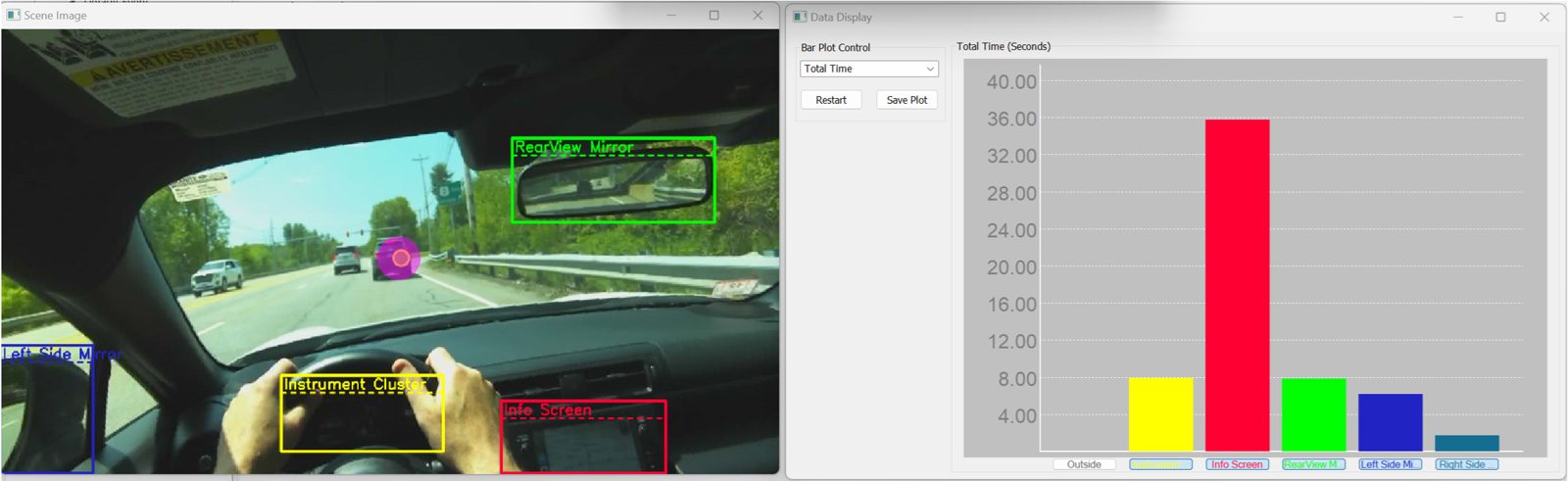
A custom model trained to recognize the information display, instrument cluster, rearview mirror, and side mirrors.
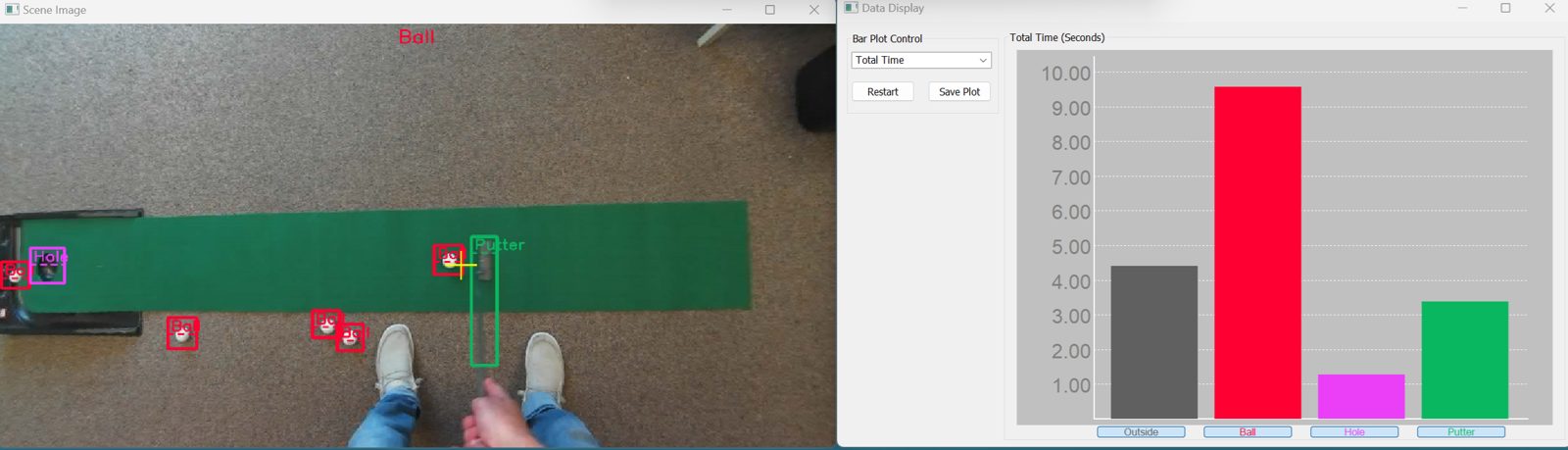
Defined objects are detected and tracked live in the scene camera image, with gaze and fixations on each object reported as they happen.
The AIObjectTraining add-on for ETAnalysis builds models for your own objects using the Moving Area of Interest workflow. Trained objects are auto-detected for all participants.
Per object: total time, fixation time, number of fixations, average fixation duration, time to first fixation, pupil size.
A closed loop between the analysis suite and the glasses. Define once, then every participant's data arrives already interpreted.
Mark what matters in your scene inside ETAnalysis. Moving areas of interest track an object frame to frame.
The AIObjectTraining module turns those definitions into a custom AI model, through an automated workflow. No machine learning expertise needed.
Load the model into ETVision. It names objects as the wearer looks at them and flags engagement in real time, with live bar plots.
The result is attention data that arrives already interpreted: not coordinates to decode later, but "the operator looked at the rearview mirror for 1.2 seconds," as it happens.
The Argus Science ETVision eye tracker uses an AI model to recognize and detect multiple objects that appear in the head-mounted scene camera image. Objects are detected and tracked in real time, and the system flags periods of gaze engagement with each object as they occur.
A standard 80-object model ships with every system. The optional AIObjectTraining add-on for ETAnalysis lets users create custom AI models for objects specific to their requirements and environment.
AI LMOT (Live Multiple Object Tracking) is the live object recognition in ETVision. An AI model finds objects in the scene camera image, tracks them, and names the one the wearer is looking at as the glance happens. Gaze and fixations on each object are reported in real time, on your own system. A standard 80-object model is included with every ETVision system.
Post-hoc AOI tracking happens after the session. An area of interest is drawn around an object in the recorded video, and software follows it frame to frame. The result is where that area was, worked out recording by recording. Live AI object detection happens during the session. A trained model recognizes objects in the scene camera image and names the one gaze lands on, as it happens. Per-object attention statistics build up while the task runs, and every participant's data arrives already labeled. The two connect in Argus software: ETAnalysis does post-hoc AOI tracking, and the moving areas of interest defined there can be trained into a custom model that runs live on ETVision.
The standard model recognizes 80 common object classes, such as person, car, chair, keyboard, clock, cup and sports ball. Most objects that research is about, such as a particular instrument panel, surgical tool or product, are not in any standard model, which is why custom training exists.
In ETAnalysis, mark the objects in your own recordings with moving areas of interest. The AIObjectTraining add-on turns those definitions into a custom AI model through an automated workflow, with no machine-learning expertise needed. Load the model into ETVision, and from then on it names those objects live for every participant. The same model can also analyze other recordings in ETAnalysis.
For each object: total time, fixation time, number of fixations, average fixation duration, time to first fixation and pupil size, shown as live bar plots that build during the task. Gaze on each object is also part of the data that streams over the network and records to file.
No. Gaze is still measured at 180 Hz on both eyes with AI LMOT running. Object recognition runs on the PC's graphics card, which is why AI LMOT needs an NVIDIA RTX 3060 or better.
Yes. Gaze on each object is available the moment it happens and streams over the network with the rest of the ETVision data, so an instructor display, a debrief station or another system can use it during the task. The SDK and the ETRemote application show how to receive it.
No. Detection runs on your local system, on models stored there. Scenes, objects, training data and recordings stay under your control, and no connectivity is required, so it works in a lab, in a vehicle, or in a facility that permits no outside network.
A Windows PC with an NVIDIA RTX 3060 or better, a CUDA-capable driver (version 31.x or later) and 16 GB of memory. Graphics cards with 4 GB or less are not suitable. Argus Science can supply a laptop with the software installed.
A Live Area of Interest (LAOI) follows a defined object as it moves, such as a monitor or a phone, and reports where gaze falls within it, in real time. AI LMOT tells you which object is being looked at; a Live Area of Interest tells you where on a defined object. The two are used one at a time: switching AI LMOT on pauses live area of interest detection, and it resumes, with its definitions intact, when AI LMOT is switched off.
Use AI LMOT when objects move, get picked up or differ between sessions, such as a person walking a store aisle or working with hand tools. Use ET3Space when the geometry is fixed, such as a cockpit, a console, a vehicle mockup or a control room, and you need gaze in room coordinates on named surfaces. ET3Space requires a motion-capture system.
Yes. AI LMOT with the standard 80-object model is included with every ETVision system. Training custom models requires the AIObjectTraining add-on for ETAnalysis. There is no annual fee.
Questions about the glasses themselves are answered in the ETVision FAQ.
Tell us what you need to track. We will show ETVision detecting it live.
Schedule a demo